

Overview
Augustus Webhook system allows you to receive event notifications whenever specific actions occur in your integration. These notifications are sent asPOST requests to your designated webhook endpoint.
Key Uses
- Update your internal system state
- Trigger follow-up actions
- Track status changes in real-time
- Receive specific events for your integration
- Configure new webhook endpoints
Events
Events follow aresource.action naming convention (e.g. order.updated, payout.paid). The payload field in each delivery is a full snapshot of the resource at the time of the event. Click any event to see its full payload schema.
Available events
Managing Webhook Subscriptions
The Augustus API provides several endpoints to manage your webhook subscriptions. Here are the key operations:Create a New Subscription
To create a new subscription, use the Create a Webhook Subscription endpoint:string
required
Your webhook endpoint URL where notifications will be sent
array
required
Array of event names you want to subscribe to
Update an Existing Subscription
To modify an existing subscription, use the Update a WebhookSubscription endpoint:string
required
The Webhook Subscription ID to update
string
New webhook endpoint URL
array
Updated array of events to subscribe to
Delete a Subscription
To remove a subscription, use the Delete a WebhookSubscription endpoint:string
required
The Webhook Subscription ID to delete
Handling Webhooks
Webhook Data Structure
Each webhook notification contains the following data:For detailed information about event-specific payloads, see the Webhook Events documentation.
Retry Mechanism
A webhook delivery is only considered successful when your endpoint responds with
HTTP Status 200.1
Initial Retries
- 30 seconds after initial failure
- 22 seconds after 1st retry
2
Mid-Range Retries
- 140 seconds after 2nd retry
- 541 seconds after 3rd retry
- 1,426 seconds after 4th retry
3
Extended Retries
- 3,200 seconds after 5th retry
- Continues up to the 15th retry (~54 hours after 14th)
Allow List IP Addresses
Augustus sends webhooks from these addresses, for both Production and Sandbox. If your server implements IP filtering, add them to your allowlist:Local Development Testing
For detailed guidance on setting up ngrok for webhook development, see this guide.Webhook Logs in the Dashboard
The Augustus Dashboard provides a comprehensive Webhook Logs view to help you monitor, debug, and manage webhook deliveries in real time.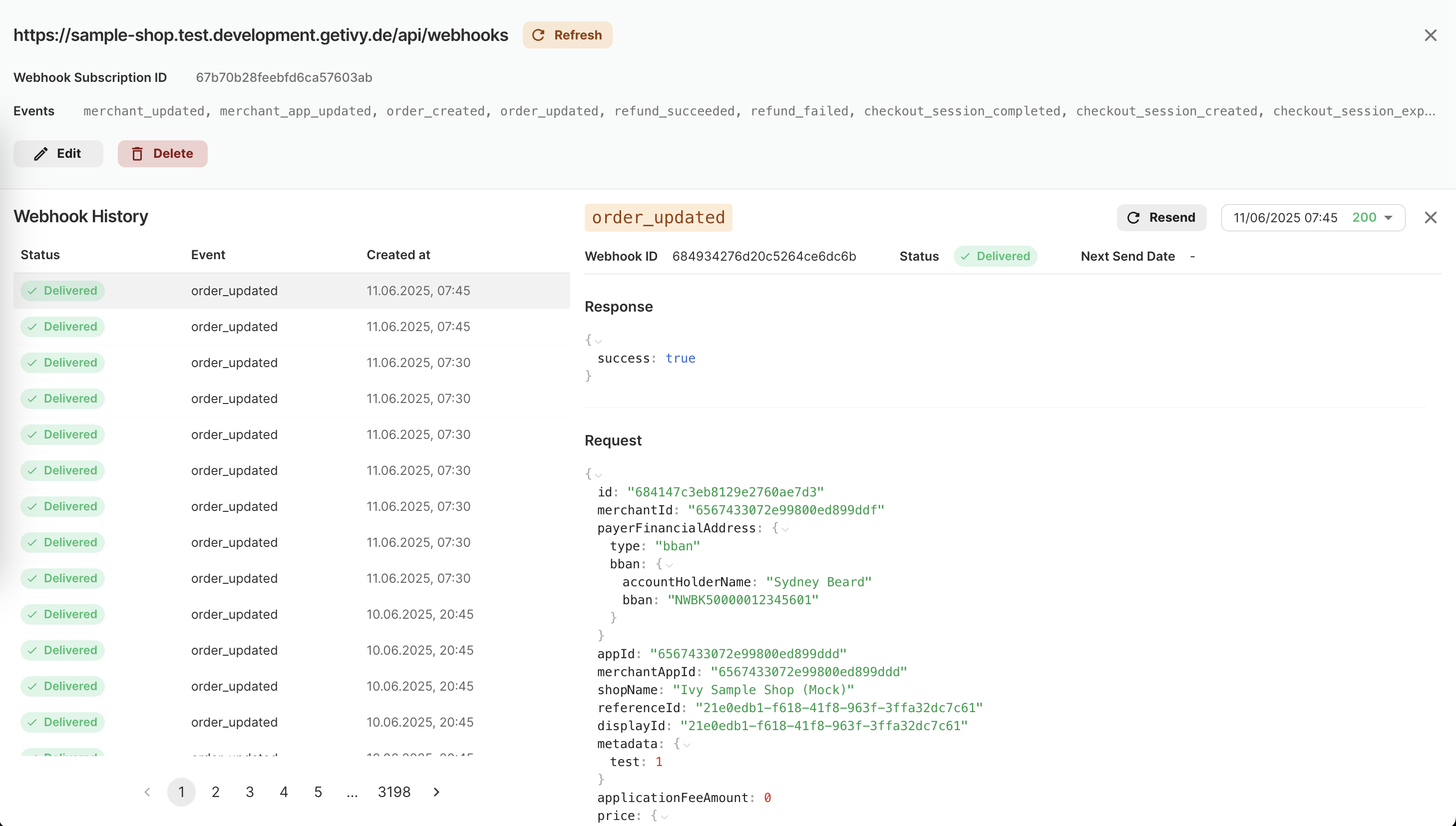
Webhook Logs overview in the Augustus Dashboard
- See a paginated history of all webhook deliveries for each subscription
- View delivery status (Delivered, Failed, etc.) at a glance
- Inspect event type and timestamp for each webhook
- Click any log entry to see full request and response payloads
- Manually resend individual webhook events for troubleshooting
- Filter or search by event type, status, or date
- Bulk history navigation for large volumes of events