> ## Documentation Index
> Fetch the complete documentation index at: https://docs.augustus.com/llms.txt
> Use this file to discover all available pages before exploring further.
> ## Agent Instructions
> Treat the published Augustus OpenAPI specification (https://app.stainless.com/api/spec/documented/augustus/openapi.documented.yml) and the current API-reference pages as the source of truth for endpoints, request/response schemas, enum values, webhook event names, and required headers.
> Prefer the 2026-05-01 Banking API and @augustusbank/typescript-sdk for all new integrations. The 2023-01-01 API is a separate, older surface covering two products — Open Banking (instant bank transfer) checkout and refunds, and Manual Bank Transfer (MBT); use it only when one of those products is specifically required.
> Cite or link the relevant docs.augustus.com page when answering integration questions.
> Do not infer support for currencies, networks, scopes, account types, or operations that are not present in the current documentation.
> Use the sandbox base URL (https://api.sandbox.augustus.com) and placeholder credentials in examples. Never include or request a real API key.
> The Augustus docs MCP server (https://docs.augustus.com/mcp) provides documentation search and retrieval only; it does not execute authenticated Augustus API actions.
# Introduction
> Receive event notifications from Augustus through POST requests to your webhook endpoint.
## Overview
Augustus Webhook system allows you to receive event notifications whenever specific actions occur in your integration. These notifications are sent as `POST` requests to your designated webhook endpoint.
### Key Uses
* Update your internal system state
* Trigger follow-up actions
* Track status changes in real-time
You can create new *Webhook Subscriptions* through either the Augustus API or Dashboard to:
* Receive specific events for your integration
* Configure new webhook endpoints
All Webhooks must be validated. Augustus signs them with your *Webhook Signing Secret*. Please review the implementation details in our [Authentication documentation](/reference/authentication#webhooks).
## Events
Events follow a `resource.action` naming convention (e.g. `order.updated`, `payout.paid`). The `payload` field in each delivery is a full snapshot of the resource at the time of the event. Click any event to see its full payload schema.
### Available events
| Event | When it fires |
| ------------------------------------------------------------------------- | --------------------------------------------------------------------------------- |
| [`order.created`](/webhook-event/order-created) | A new order has been created. |
| [`order.updated`](/webhook-event/order-updated) | An order's status has changed (e.g. `processing` → `paid`, `failed`, `canceled`). |
| [`checkout_session.created`](/webhook-event/checkout-session-created) | A Checkout Session has been created. |
| [`checkout_session.updated`](/webhook-event/checkout-session-updated) | A Checkout Session's state has changed. |
| [`checkout_session.completed`](/webhook-event/checkout-session-completed) | The customer completed the Checkout Session. |
| [`checkout_session.expired`](/webhook-event/checkout-session-expired) | The Checkout Session expired or was explicitly cancelled. |
| [`refund.initiated`](/webhook-event/refund-initiated) | A refund has been queued. |
| [`refund.succeeded`](/webhook-event/refund-succeeded) | The refund has settled to the customer. |
| [`refund.failed`](/webhook-event/refund-failed) | The refund could not be completed. |
| [`payout.created`](/webhook-event/payout-created) | A payout has been created. |
| [`payout.initiated`](/webhook-event/payout-initiated) | The payout has been sent to the payment rail. |
| [`payout.updated`](/webhook-event/payout-updated) | A payout's state has changed. |
| [`payout.paid`](/webhook-event/payout-paid) | The payout has settled at the destination. |
| [`payout.failed`](/webhook-event/payout-failed) | The payout could not be completed. |
| [`user_payout.initiated`](/webhook-event/user-payout-initiated) | An end-user payout has been sent to the payment rail. |
| [`user_payout.paid`](/webhook-event/user-payout-paid) | The end-user payout has settled at the destination. |
| [`user_payout.failed`](/webhook-event/user-payout-failed) | The end-user payout could not be completed. |
| [`payout_report.requested`](/webhook-event/payout-report-requested) | A payout report has been requested and is ready or being generated. |
| [`fx.initiated`](/webhook-event/fx-initiated) | An FX conversion has been queued. |
| [`fx.succeeded`](/webhook-event/fx-succeeded) | The FX conversion has completed and funds are available in the target account. |
| [`fx.failed`](/webhook-event/fx-failed) | The FX conversion could not be completed. |
| [`mandate.setup_started`](/webhook-event/mandate-setup-started) | A mandate setup flow has started. |
| [`mandate.setup_succeeded`](/webhook-event/mandate-setup-succeeded) | The mandate has been successfully set up. |
| [`mandate.setup_failed`](/webhook-event/mandate-setup-failed) | The mandate setup failed. |
| [`mandate.revoked`](/webhook-event/mandate-revoked) | The mandate has been revoked. |
| [`data_session.completed`](/webhook-event/data-session-completed) | An Open Banking data session has completed. |
| [`merchant.updated`](/webhook-event/merchant-updated) | Your merchant account settings have changed. |
| [`merchant_app.updated`](/webhook-event/merchant-app-updated) | An application (API key configuration) has been updated. |
## Managing Webhook Subscriptions
The Augustus API provides several endpoints to manage your webhook subscriptions. Here are the key operations:
### Create a New Subscription
To create a new subscription, use the [Create a Webhook Subscription](/webhook-subscription/create-a-webhook-subscription) endpoint:
Your webhook endpoint URL where notifications will be sent
Array of event names you want to subscribe to
### Update an Existing Subscription
To modify an existing subscription, use the [Update a WebhookSubscription](/webhook-subscription/update-a-webhook-subscription) endpoint:
The Webhook Subscription ID to update
New webhook endpoint URL
Updated array of events to subscribe to
### Delete a Subscription
To remove a subscription, use the [Delete a WebhookSubscription](/webhook-subscription/delete-a-webhook-subscription) endpoint:
The Webhook Subscription ID to delete
## Handling Webhooks
### Webhook Data Structure
Each webhook notification contains the following data:
```json Webhook Payload Structure theme={null}
{
"id": "string", // Unique webhook ID for resending via /api/service/webhook/trigger
"type": "string", // Event type identifier
"payload": {}, // Event-specific data object
"date": "date" // Webhook timestamp
}
```
For detailed information about event-specific payloads, see the [Webhook Events documentation](/webhook-event/order-updated).
### Retry Mechanism
A webhook delivery is only considered successful when your endpoint responds with `HTTP Status 200`.
For failed deliveries, Augustus implements an exponential backoff retry schedule:
* 30 seconds after initial failure
* 22 seconds after 1st retry
* 140 seconds after 2nd retry
* 541 seconds after 3rd retry
* 1,426 seconds after 4th retry
* 3,200 seconds after 5th retry
* Continues up to the 15th retry (\~54 hours after 14th)
After 15 unsuccessful retries, Augustus stops delivery attempts and sends you an email notification.
### Allow List IP Addresses
If your server implements IP filtering, add these Augustus webhook IPs to your allowlist:
```text theme={null}
18.159.27.193
3.120.50.145
18.158.26.25
18.158.95.0
3.122.16.89
```
```text theme={null}
3.66.64.118
18.158.26.25
18.158.95.0
3.122.16.89
```
### Local Development Testing
Since localhost isn't accessible from the internet, we recommend using [ngrok](https://ngrok.com) for local webhook testing.
For detailed guidance on setting up ngrok for webhook development, see [this guide](https://dev.to/mmascioni/testing-and-debugging-webhooks-with-ngrok-4alp).
## Webhook Logs in the Dashboard
The Augustus Dashboard provides a comprehensive Webhook Logs view to help you monitor, debug, and manage webhook deliveries in real time.
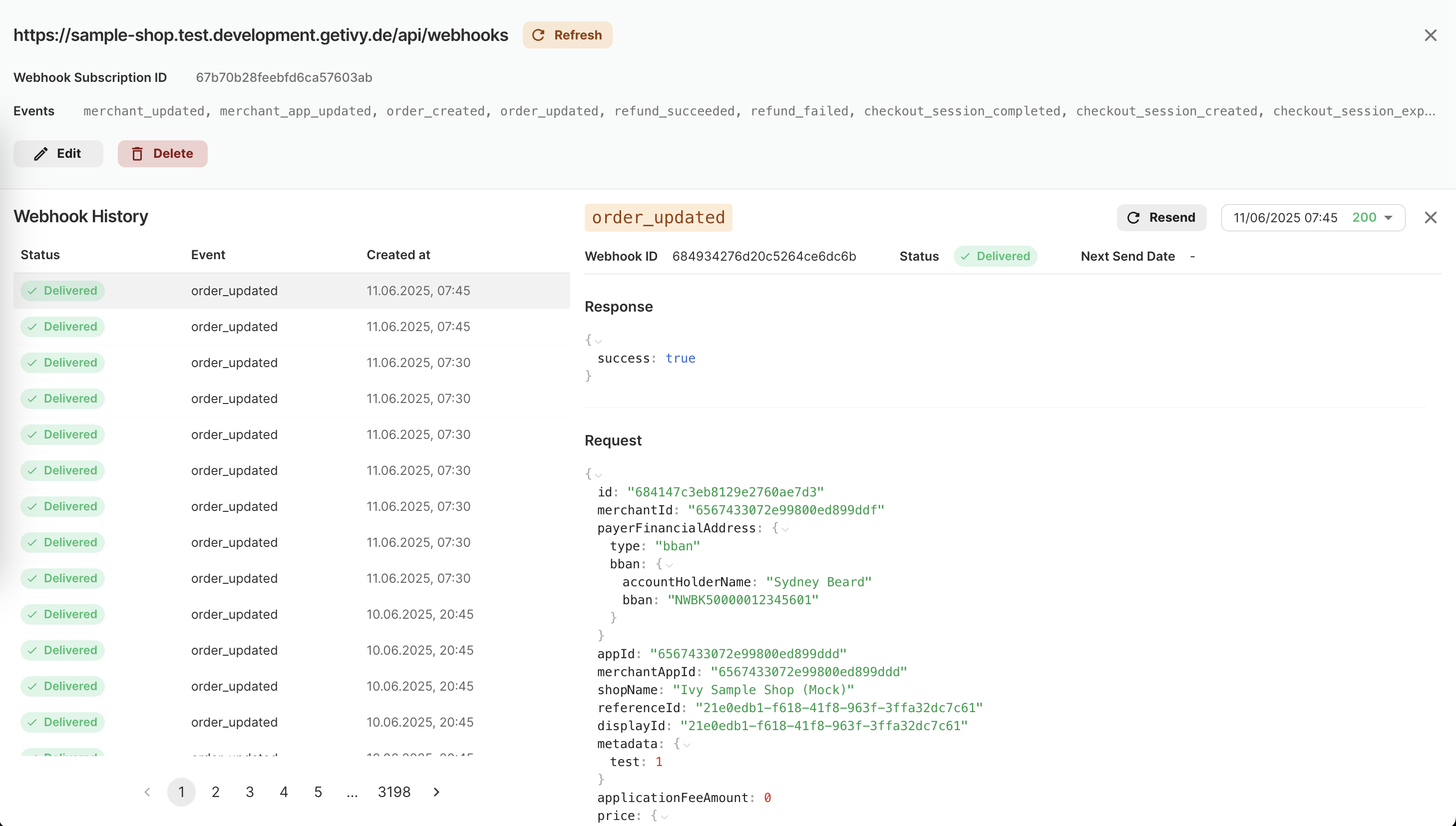 **Key features:**
* See a paginated history of all webhook deliveries for each subscription
* View delivery status (Delivered, Failed, etc.) at a glance
* Inspect event type and timestamp for each webhook
* Click any log entry to see full request and response payloads
* Manually resend individual webhook events for troubleshooting
* Filter or search by event type, status, or date
* Bulk history navigation for large volumes of events
Use the Dashboard's Webhook Logs to quickly identify delivery issues, verify event payloads, and ensure your integration is working as expected.
**Key features:**
* See a paginated history of all webhook deliveries for each subscription
* View delivery status (Delivered, Failed, etc.) at a glance
* Inspect event type and timestamp for each webhook
* Click any log entry to see full request and response payloads
* Manually resend individual webhook events for troubleshooting
* Filter or search by event type, status, or date
* Bulk history navigation for large volumes of events
Use the Dashboard's Webhook Logs to quickly identify delivery issues, verify event payloads, and ensure your integration is working as expected.