> ## Documentation Index
> Fetch the complete documentation index at: https://docs.augustus.com/llms.txt
> Use this file to discover all available pages before exploring further.
> ## Agent Instructions
> Treat the published Augustus OpenAPI specification (https://app.stainless.com/api/spec/documented/augustus/openapi.documented.yml) and the current API-reference pages as the source of truth for endpoints, request/response schemas, enum values, webhook event names, and required headers.
> Prefer the 2026-05-01 Banking API and @augustusbank/typescript-sdk for all new integrations. The 2023-01-01 API is a separate, older surface covering two products — Open Banking (instant bank transfer) checkout and refunds, and Manual Bank Transfer (MBT); use it only when one of those products is specifically required.
> Cite or link the relevant docs.augustus.com page when answering integration questions.
> Do not infer support for currencies, networks, scopes, account types, or operations that are not present in the current documentation.
> Use the sandbox base URL (https://api.sandbox.augustus.com) and placeholder credentials in examples. Never include or request a real API key.
> The Augustus docs MCP server (https://docs.augustus.com/mcp) provides documentation search and retrieval only; it does not execute authenticated Augustus API actions.
# Open Banking
> Customer-initiated instant bank checkout: integration, client embedding, Remember Me, statuses, and failure handling.
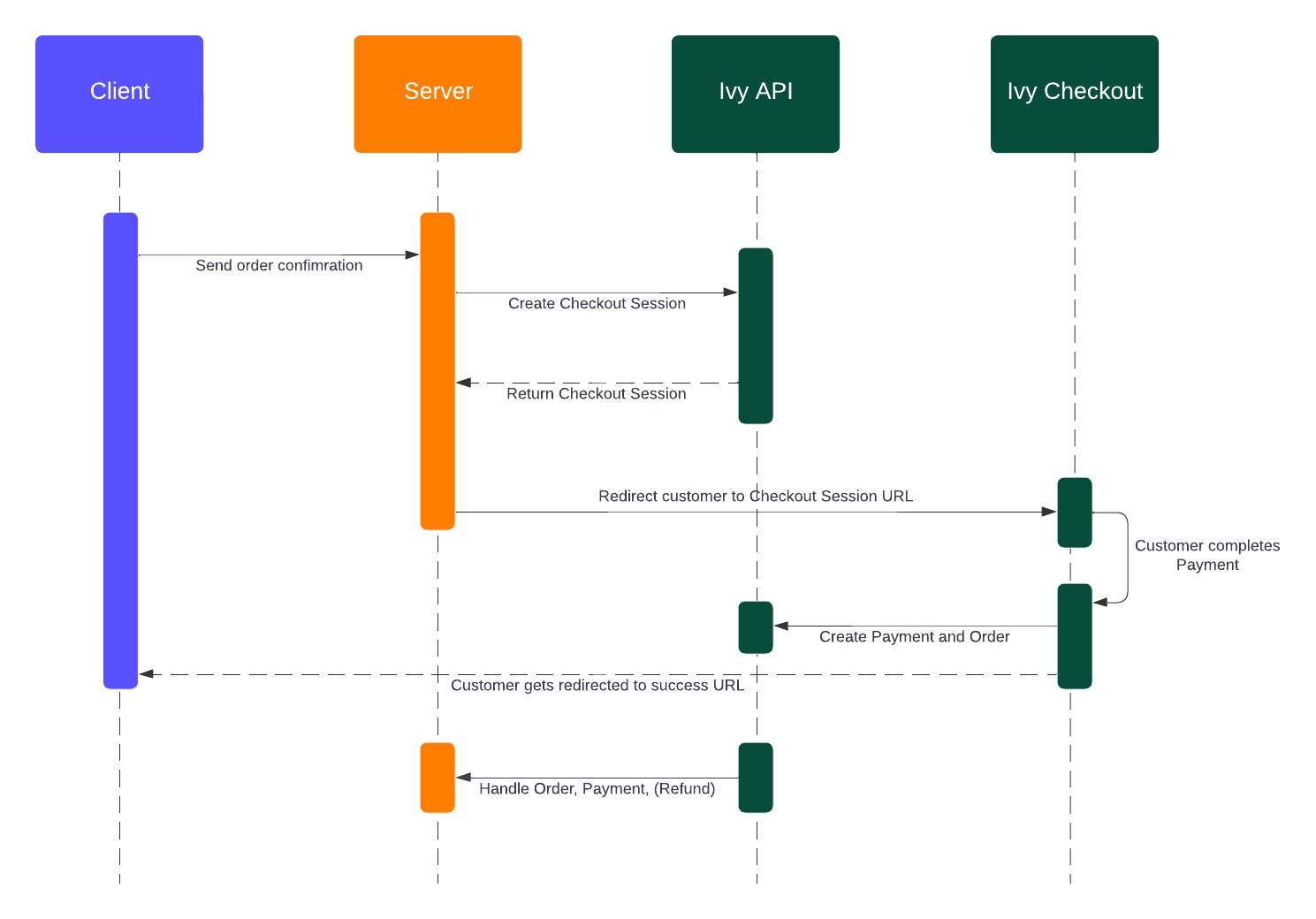
Let customers pay you directly from their bank account. Create a Checkout Session for each payment attempt, redirect the customer to authorize the payment in their bank, and track the resulting order via webhooks.
Open Banking is available only in the 2023-01-01 API.
## Integration flow
Submit payment parameters and receive a `redirectUrl`.
Send the customer to `redirectUrl` for the Augustus-hosted bank selection and authorization screens.
The customer lands back at your `successCallbackUrl` or `errorCallbackUrl`.
Subscribe to `order_updated` webhooks for real-time status.
### Create a Checkout Session
```ts 2023-01-01 theme={null}
import Ivy from '@getivy/node-sdk'
const client = new Ivy()
const session = await client.checkoutsession.create({
price: { total: 119, currency: 'EUR' },
referenceId: 'my-unique-reference-id',
successCallbackUrl: 'https://my-website.com/success',
errorCallbackUrl: 'https://my-website.com/try-again',
paymentSchemeSelection: 'instant_preferred',
market: 'DE',
customer: { email: 'customer@example.com' },
})
const { redirectUrl, id } = session
```
[**POST** `/api/service/checkout/session/create` in the API Reference →](/api-reference/checkout/create-a-checkout-session)
#### Configuration options
| Field | Description |
| ------------------------ | ------------------------------------------------------------------------------------------------------------------------------------------------------------------------------------------------------------------------------------------------- |
| `paymentSchemeSelection` | `instant_only`, `instant_preferred` (default), or `standard`. Controls whether Augustus uses instant rails (SEPA Instant, Faster Payments) or falls back to standard. Default is set per application — contact your account manager to change it. |
| `market` | ISO 3166-1 alpha-2 code (e.g. `DE`, `GB`) to pre-select the country. Auto-detected from the customer's IP if omitted. Ignored if `prefill.bankId` is set. |
| `customer.email` | Email of the paying customer. Enables [Remember Me](#remember-me). Must be under `customer.email`, not `prefill`. |
### Redirect the customer
Redirect the customer to `session.redirectUrl`. To embed instead of redirect, see [Client integration](#client-integration).
### Handle the return
The customer lands at your `successCallbackUrl` or `errorCallbackUrl` with these query parameters:
| Param | Type | Description |
| ------------- | ------- | ------------------------------------------------------ |
| `referenceId` | string | Your original reference ID. |
| `order-id` | string | The Augustus order ID (success only). |
| `user_closed` | boolean | `true` if the customer explicitly closed the checkout. |
When `user_closed` is `true`, you can expire the Checkout Session with `client.checkoutsession.expire({ id })` to trigger webhooks and update your internal state.
### Track the order
When the customer completes payment, the Checkout Session is `closed` and a new `order` is created. Subscribe to `order_updated` and handle these statuses:
| Status | Action |
| ---------- | -------------------------------------------------------------------- |
| `paid` | Funds have settled or are guaranteed by Augustus. Fulfill the order. |
| `failed` | Payment did not succeed and won't arrive. Offer a retry. |
| `canceled` | Session expired or was canceled. Clean up your state. |
```ts server/routes/webhooks.ts theme={null}
import express from 'express'
const router = express.Router()
router.post('/webhooks/augustus', express.json(), async (req, res) => {
const { type, payload } = req.body
if (type === 'order_updated') {
switch (payload.status) {
case 'paid':
await fulfillOrder(payload.referenceId)
break
case 'failed':
case 'canceled':
await markOrderFailed(payload.referenceId, payload.statusClassification)
break
}
}
res.sendStatus(200)
})
export default router
```
See [Status flow](#status-flow) for the full lifecycle, [Failure reasons](#failure-reasons) for `statusClassification`, and [Webhooks](/webhook-getting-started/introduction) for setup and signature verification.
## Client integration
Recommended integration per platform:
* **Desktop web** — embed via the [React SDK](https://www.npmjs.com/package/@getivy/react-sdk) or an iframe.
* **Mobile web** — redirect to the Augustus-hosted checkout.
* **Mobile native** — open the Augustus-hosted checkout in the user's default browser; return via deep linking.
### Backend setup
Create a server-side endpoint that initiates a Checkout Session and returns the `redirectUrl` to your frontend.
```ts server/routes/checkout.ts theme={null}
import express from 'express'
import Ivy from '@getivy/node-sdk'
const router = express.Router()
const client = new Ivy()
router.post('/api/checkout', async (req, res) => {
const session = await client.checkoutsession.create({
referenceId: 'order_123',
price: {
total: req.body.amount,
currency: req.body.currency || 'EUR',
},
locale: req.body.locale || 'en',
successCallbackUrl: 'https://example.com/success',
errorCallbackUrl: 'https://example.com/error',
customer: {
email: 'john.doe@example.com',
},
})
res.json({ url: session.redirectUrl })
})
export default router
```
### Desktop web
Use the [React SDK](https://www.npmjs.com/package/@getivy/react-sdk) to embed the checkout in your page.
* Embedded iframe: append `&iframe=true` to the checkout URL.
* Modal iframe: append `&popup=true` to the checkout URL.
The API doesn't include these parameters — you set them at render time. The React SDK does this automatically.
#### React SDK
```bash theme={null}
npm install @getivy/react-sdk
```
```tsx components/IvyCheckout.tsx theme={null}
import { IvyCheckout } from '@getivy/react-sdk'
export async function Checkout({
amount,
currency = 'EUR',
locale = 'de',
handleSuccess,
handleCancel,
}: {
amount: number
currency?: string
locale?: string
handleSuccess: (data: { redirectUrl: string; referenceId: string }) => void
handleCancel: (data: { redirectUrl: string; referenceId: string }) => void
}) {
const response = await fetch('/api/checkout', {
method: 'POST',
headers: { 'Content-Type': 'application/json' },
body: JSON.stringify({ amount, currency, locale }),
})
const { url } = await response.json()
return (
)
}
```
The React SDK automatically appends `&iframe=true` when using embedded mode.
```css styles/ivy-checkout.css theme={null}
@import "@getivy/react-sdk/dist/index.css";
.ivy-embedded-checkout-screen {
width: 100%;
height: 100%;
border: none;
}
.ivy-modal-content {
position: fixed;
inset: 0;
z-index: 999999;
display: flex;
align-items: center;
justify-content: center;
background-color: rgba(10, 10, 10, 0.25);
}
.ivy-modal-content .ivy-modal-iframe-container {
width: 100%;
height: 100%;
border-radius: 16px;
overflow: hidden;
}
@media (max-width: 450px) {
.ivy-modal-content .ivy-modal-iframe-container {
border-radius: 0;
}
}
```
#### Plain HTML (without the SDK)
If you can't use React, render the iframe directly. The iframe communicates with your page via [`postMessage`](https://developer.mozilla.org/en-US/docs/Web/API/Window/postMessage).
```html checkout.html theme={null}
```
The iframe sends a `postMessage` with the following fields:
| Field | Description |
| ------------- | ----------------------------------------------------------- |
| `source` | Always `"ivy"`. |
| `type` | Always `"iframe"`. |
| `value` | Either `"success"` or `"error"`. |
| `referenceId` | Your original `referenceId` from Checkout Session creation. |
The iframe `sandbox` attributes are required:
* `allow-scripts` — required for the checkout to function.
* `allow-same-origin` — enables secure communication.
* `allow-forms` — required for payment form input.
* `allow-popups`, `allow-popups-to-escape-sandbox` — required for bank redirects.
* `allow-top-navigation` — required for completion redirects.
* `allow="clipboard-write"` — required for copy-to-clipboard buttons.
### Mobile web
On mobile, redirect to the Augustus-hosted checkout. An iframe breaks the flow when the customer moves to and from their banking app.
```javascript theme={null}
function isMobile() {
return /Android|webOS|iPhone|iPad|iPod|BlackBerry|IEMobile|Opera Mini/i.test(navigator.userAgent)
}
async function startCheckout() {
const response = await fetch('/api/checkout', {
method: 'POST',
headers: { 'Content-Type': 'application/json' },
body: JSON.stringify({ amount: 100, currency: 'EUR' }),
})
const { url } = await response.json()
if (isMobile()) {
window.location.href = url
} else {
// Render the iframe on desktop — see above.
}
}
```
Make sure the `successCallbackUrl` and `errorCallbackUrl` you pass to the Checkout Session point to pages on your site where the user lands after the bank flow completes.
### Mobile native
Open the checkout in the user's **default browser**. Do not use a WebView — it breaks bank authentication, deep linking, SSL, and session handling.
```javascript theme={null}
// Don't do this
// Do this instead
Linking.openURL(checkoutUrl)
```
#### Open the checkout
```javascript React Native theme={null}
import { Linking } from 'react-native'
const openCheckoutInBrowser = async () => {
const response = await fetch('/api/checkout', {
method: 'POST',
headers: { 'Content-Type': 'application/json' },
body: JSON.stringify({ amount: 100, currency: 'EUR' }),
})
const { url } = await response.json()
if (await Linking.canOpenURL(url)) {
await Linking.openURL(url)
}
}
```
```swift iOS (Swift) theme={null}
import SafariServices
func openCheckoutInBrowser() {
guard let url = URL(string: checkoutUrl) else { return }
let safariVC = SFSafariViewController(url: url)
safariVC.delegate = self
present(safariVC, animated: true)
}
```
```kotlin Android (Kotlin) theme={null}
fun openCheckoutInBrowser() {
val intent = Intent(Intent.ACTION_VIEW, Uri.parse(checkoutUrl))
intent.addFlags(Intent.FLAG_ACTIVITY_NEW_TASK)
startActivity(intent)
}
```
#### Deep linking back to your app
Configure deep linking so the user returns to your app after payment:
```javascript theme={null}
import { Linking } from 'react-native'
useEffect(() => {
const handleDeepLink = ({ url }) => {
if (url.includes('payment-success')) {
navigation.navigate('PaymentSuccess')
} else if (url.includes('payment-error')) {
navigation.navigate('PaymentError')
}
}
const subscription = Linking.addEventListener('url', handleDeepLink)
return () => subscription.remove()
}, [])
```
Configure your app's deep-linking scheme so the Augustus return URLs open your app.
## Remember Me
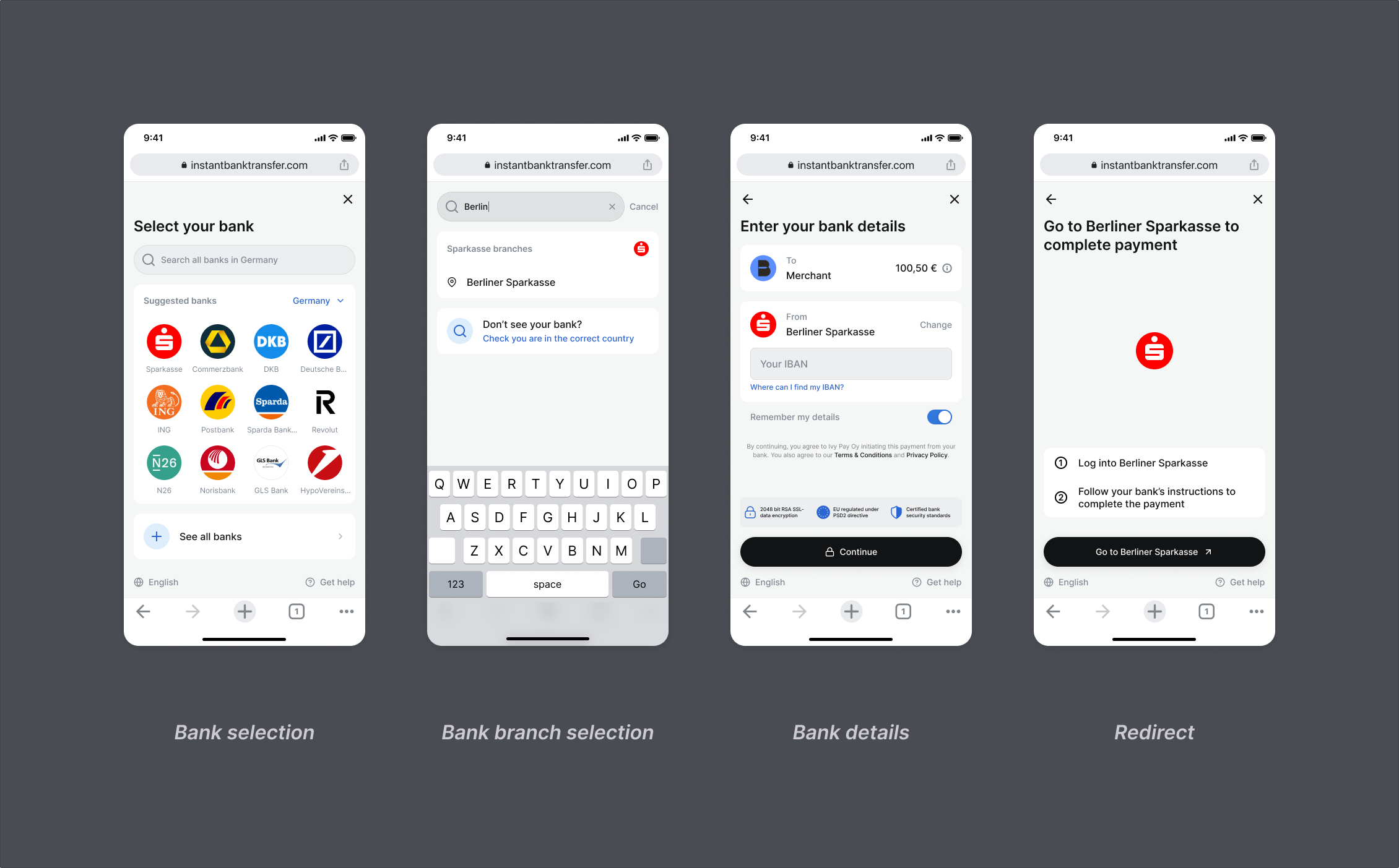
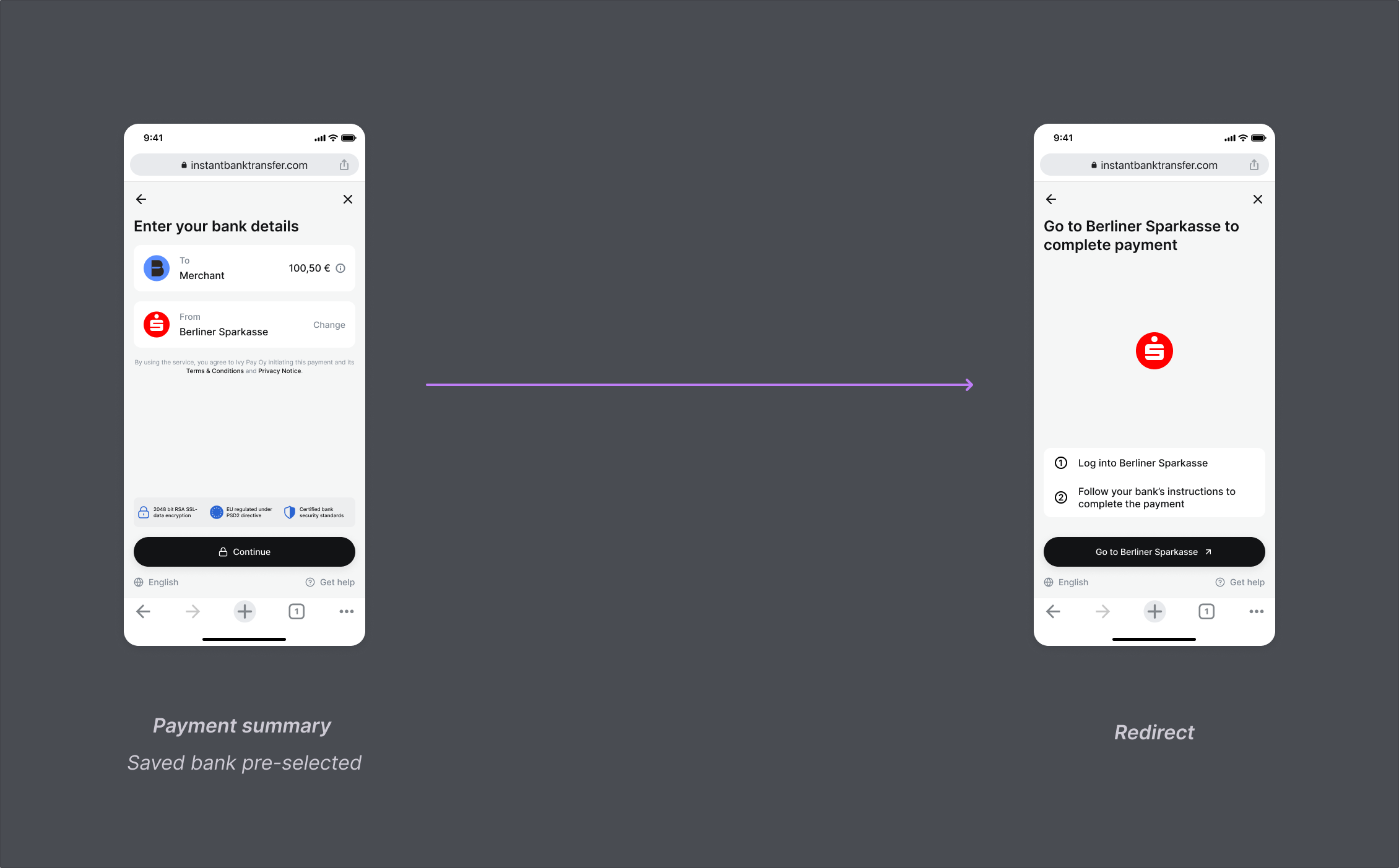
Pass a `customer.email` or a stored `customer.id` on each Checkout Session. Augustus recognizes the returning customer and skips bank selection.
Pass the email under `customer.email`, not under `prefill`. Only `customer.email` is used for Remember Me recognition.
#### First-time flow
#### Recurring flow
### Pass a customer email
```ts 2023-01-01 theme={null}
import Ivy from '@getivy/node-sdk'
const client = new Ivy()
const session = await client.checkoutsession.create({
price: { total: 119, currency: 'EUR' },
referenceId: 'my-unique-reference-id',
successCallbackUrl: 'https://my-website.com/success',
errorCallbackUrl: 'https://my-website.com/try-again',
customer: { email: 'customer@example.com' },
})
```
```ts 2023-01-01 theme={null}
import Ivy from '@getivy/node-sdk'
const client = new Ivy()
const customer = await client.customers.create({ email: 'customer@example.com' })
const session = await client.checkoutsession.create({
price: { total: 119, currency: 'EUR' },
referenceId: 'my-unique-reference-id',
successCallbackUrl: 'https://my-website.com/success',
errorCallbackUrl: 'https://my-website.com/try-again',
customer: { id: customer.id },
})
```
## Status flow
Augustus tracks Open Banking and Manual Bank Transfer payments through the `order.status` field. Poll the order or subscribe to `order_updated` webhooks — status values are identical in both.
```ts 2023-01-01 theme={null}
import Ivy from '@getivy/node-sdk'
const client = new Ivy()
const order = await client.orders.retrieve({ id: 'your-order-id' })
```
### Statuses
| Status | Description | Next | Terminal |
| --------------------- | ------------------------------------------------------------------------------------------------------------------------------------------------------------------------------------- | ----------------------------------------------------------------- | ------------------------------ |
| `processing` | Order created and payment flow started. | `waiting_for_payment`, `paid`, `finalizing`, `failed`, `canceled` | No |
| `waiting_for_payment` | Customer authorized the payment. Settlement pending. Not guaranteed. Skipped if settlement happens first. | `paid`, `finalizing`, `failed`, `canceled` | No (yes for direct settlement) |
| `finalizing` | Payment received, booking verification in progress. Usually minutes, up to 48 hours. Can still be expired via API. | `paid`, `canceled` | No |
| `paid` | Funds arrived or are guaranteed by Augustus. Settlement takes anywhere from instant to 3 business days depending on scheme. Only appears when Augustus holds your collection account. | `in_refund` | Yes (unless refunded) |
| `canceled` | Session expired or was canceled. Late payments are auto-returned. | — | Yes |
| `failed` | Funds did not arrive in time (6 days for `instant_preferred` / `standard`, 24 hours for `instant_only`). Late payments are auto-returned. | — | Yes |
| `in_refund` | Refund in flight to the customer's bank. | `refunded`, `partially_refunded` | No |
| `refunded` | Fully refunded. | — | Yes |
| `partially_refunded` | Part of the order was refunded. | `in_refund` | No |
Payments don't always follow the common path — handle every transition in your integration.
## Failure reasons
When an order fails or is canceled, the `order_updated` webhook includes a `statusClassification` object with a broad `primary` category and a specific `secondary` reason.
```json theme={null}
{
"statusClassification": {
"primary": "payment_execution_failed",
"secondary": "insufficient_funds"
}
}
```
### Primary classifications
| Primary | Meaning | Common causes | Handling |
| ------------------------------ | ------------------------------------------ | --------------------------------------------------------------------------------------------- | ----------------------------------------------------------------- |
| `payment_authorization_failed` | Rejected during authorization at the bank. | Wrong credentials, canceled at bank, account restrictions. | Suggest retry, check credentials, try a different bank. |
| `payment_execution_failed` | Authorized but couldn't execute. | Insufficient funds, account limits, blocked international transfer, bank rejection or outage. | Retry — if the original payment arrives late, it's auto-returned. |
| `payment_abandoned` | Started but never completed. | Customer closed the browser, session timed out, canceled at the bank. | Show clear messaging, allow retry. |
### Secondary classifications
| Code | Description |
| --------------------------------------- | --------------------------------------------------------------------- |
| `wrong_credentials` | User entered incorrect bank credentials during authentication. |
| `incorrect_2fa_response` | User provided an incorrect two-factor authentication response. |
| `pin_blocked` | User's PIN is blocked, e.g. after multiple failed attempts. |
| `no_active_tan_methods_available` | No active TAN (Transaction Authentication Number) methods available. |
| `timeout` | The payment request timed out due to slow response from bank systems. |
| `connection_to_bank_failed` | The user's bank is not responding to the payment request. |
| `bank_error` | The bank's system returned an error during processing. |
| `bank_under_maintenance` | The user's bank is currently under maintenance. |
| `insufficient_funds` | The user's account has insufficient funds for the payment. |
| `account_limit_exceeded` | The payment exceeds the user's account transfer limits. |
| `international_transfer_blocked` | International transfers are blocked for this account. |
| `international_transfer_limit_exceeded` | The payment exceeds international transfer limits. |
| `instant_transfers_not_enabled` | Instant transfers are not enabled for this account. |
| `user_blocked` | The user's account is blocked or restricted. |
| `unsupported_bank_account` | The bank account type is not supported for the requested transfer. |
| `payment_rejected` | The payment was explicitly rejected by the bank. |
| `cancelled` | The payment was canceled by the user or bank. |
| `payment_not_settled` | The payment was not settled within the required timeframe. |
See [Webhooks](/webhook-getting-started/introduction) for setup and signature verification.
## Closed-loop payouts
Pay out to a customer from a previous checkout by referencing their order ID instead of bank details:
```ts 2023-01-01 theme={null}
import Ivy from '@getivy/node-sdk'
const client = new Ivy()
const payout = await client.payouts.create({
amount: 100,
currency: 'EUR',
destination: { type: 'customer', orderId: 'order_abc123' },
})
```
[**POST** `/api/service/payout` in the API Reference →](/api-reference/payout/create-a-payout)
 ### Create a Checkout Session
```ts 2023-01-01 theme={null}
import Ivy from '@getivy/node-sdk'
const client = new Ivy()
const session = await client.checkoutsession.create({
price: { total: 119, currency: 'EUR' },
referenceId: 'my-unique-reference-id',
successCallbackUrl: 'https://my-website.com/success',
errorCallbackUrl: 'https://my-website.com/try-again',
paymentSchemeSelection: 'instant_preferred',
market: 'DE',
customer: { email: 'customer@example.com' },
})
const { redirectUrl, id } = session
```
[**POST** `/api/service/checkout/session/create` in the API Reference →](/api-reference/checkout/create-a-checkout-session)
#### Configuration options
| Field | Description |
| ------------------------ | ------------------------------------------------------------------------------------------------------------------------------------------------------------------------------------------------------------------------------------------------- |
| `paymentSchemeSelection` | `instant_only`, `instant_preferred` (default), or `standard`. Controls whether Augustus uses instant rails (SEPA Instant, Faster Payments) or falls back to standard. Default is set per application — contact your account manager to change it. |
| `market` | ISO 3166-1 alpha-2 code (e.g. `DE`, `GB`) to pre-select the country. Auto-detected from the customer's IP if omitted. Ignored if `prefill.bankId` is set. |
| `customer.email` | Email of the paying customer. Enables [Remember Me](#remember-me). Must be under `customer.email`, not `prefill`. |
### Redirect the customer
Redirect the customer to `session.redirectUrl`. To embed instead of redirect, see [Client integration](#client-integration).
### Handle the return
The customer lands at your `successCallbackUrl` or `errorCallbackUrl` with these query parameters:
| Param | Type | Description |
| ------------- | ------- | ------------------------------------------------------ |
| `referenceId` | string | Your original reference ID. |
| `order-id` | string | The Augustus order ID (success only). |
| `user_closed` | boolean | `true` if the customer explicitly closed the checkout. |
When `user_closed` is `true`, you can expire the Checkout Session with `client.checkoutsession.expire({ id })` to trigger webhooks and update your internal state.
### Track the order
When the customer completes payment, the Checkout Session is `closed` and a new `order` is created. Subscribe to `order_updated` and handle these statuses:
| Status | Action |
| ---------- | -------------------------------------------------------------------- |
| `paid` | Funds have settled or are guaranteed by Augustus. Fulfill the order. |
| `failed` | Payment did not succeed and won't arrive. Offer a retry. |
| `canceled` | Session expired or was canceled. Clean up your state. |
```ts server/routes/webhooks.ts theme={null}
import express from 'express'
const router = express.Router()
router.post('/webhooks/augustus', express.json(), async (req, res) => {
const { type, payload } = req.body
if (type === 'order_updated') {
switch (payload.status) {
case 'paid':
await fulfillOrder(payload.referenceId)
break
case 'failed':
case 'canceled':
await markOrderFailed(payload.referenceId, payload.statusClassification)
break
}
}
res.sendStatus(200)
})
export default router
```
See [Status flow](#status-flow) for the full lifecycle, [Failure reasons](#failure-reasons) for `statusClassification`, and [Webhooks](/webhook-getting-started/introduction) for setup and signature verification.
## Client integration
Recommended integration per platform:
* **Desktop web** — embed via the [React SDK](https://www.npmjs.com/package/@getivy/react-sdk) or an iframe.
* **Mobile web** — redirect to the Augustus-hosted checkout.
* **Mobile native** — open the Augustus-hosted checkout in the user's default browser; return via deep linking.
### Backend setup
Create a server-side endpoint that initiates a Checkout Session and returns the `redirectUrl` to your frontend.
```ts server/routes/checkout.ts theme={null}
import express from 'express'
import Ivy from '@getivy/node-sdk'
const router = express.Router()
const client = new Ivy()
router.post('/api/checkout', async (req, res) => {
const session = await client.checkoutsession.create({
referenceId: 'order_123',
price: {
total: req.body.amount,
currency: req.body.currency || 'EUR',
},
locale: req.body.locale || 'en',
successCallbackUrl: 'https://example.com/success',
errorCallbackUrl: 'https://example.com/error',
customer: {
email: 'john.doe@example.com',
},
})
res.json({ url: session.redirectUrl })
})
export default router
```
### Desktop web
Use the [React SDK](https://www.npmjs.com/package/@getivy/react-sdk) to embed the checkout in your page.
### Create a Checkout Session
```ts 2023-01-01 theme={null}
import Ivy from '@getivy/node-sdk'
const client = new Ivy()
const session = await client.checkoutsession.create({
price: { total: 119, currency: 'EUR' },
referenceId: 'my-unique-reference-id',
successCallbackUrl: 'https://my-website.com/success',
errorCallbackUrl: 'https://my-website.com/try-again',
paymentSchemeSelection: 'instant_preferred',
market: 'DE',
customer: { email: 'customer@example.com' },
})
const { redirectUrl, id } = session
```
[**POST** `/api/service/checkout/session/create` in the API Reference →](/api-reference/checkout/create-a-checkout-session)
#### Configuration options
| Field | Description |
| ------------------------ | ------------------------------------------------------------------------------------------------------------------------------------------------------------------------------------------------------------------------------------------------- |
| `paymentSchemeSelection` | `instant_only`, `instant_preferred` (default), or `standard`. Controls whether Augustus uses instant rails (SEPA Instant, Faster Payments) or falls back to standard. Default is set per application — contact your account manager to change it. |
| `market` | ISO 3166-1 alpha-2 code (e.g. `DE`, `GB`) to pre-select the country. Auto-detected from the customer's IP if omitted. Ignored if `prefill.bankId` is set. |
| `customer.email` | Email of the paying customer. Enables [Remember Me](#remember-me). Must be under `customer.email`, not `prefill`. |
### Redirect the customer
Redirect the customer to `session.redirectUrl`. To embed instead of redirect, see [Client integration](#client-integration).
### Handle the return
The customer lands at your `successCallbackUrl` or `errorCallbackUrl` with these query parameters:
| Param | Type | Description |
| ------------- | ------- | ------------------------------------------------------ |
| `referenceId` | string | Your original reference ID. |
| `order-id` | string | The Augustus order ID (success only). |
| `user_closed` | boolean | `true` if the customer explicitly closed the checkout. |
When `user_closed` is `true`, you can expire the Checkout Session with `client.checkoutsession.expire({ id })` to trigger webhooks and update your internal state.
### Track the order
When the customer completes payment, the Checkout Session is `closed` and a new `order` is created. Subscribe to `order_updated` and handle these statuses:
| Status | Action |
| ---------- | -------------------------------------------------------------------- |
| `paid` | Funds have settled or are guaranteed by Augustus. Fulfill the order. |
| `failed` | Payment did not succeed and won't arrive. Offer a retry. |
| `canceled` | Session expired or was canceled. Clean up your state. |
```ts server/routes/webhooks.ts theme={null}
import express from 'express'
const router = express.Router()
router.post('/webhooks/augustus', express.json(), async (req, res) => {
const { type, payload } = req.body
if (type === 'order_updated') {
switch (payload.status) {
case 'paid':
await fulfillOrder(payload.referenceId)
break
case 'failed':
case 'canceled':
await markOrderFailed(payload.referenceId, payload.statusClassification)
break
}
}
res.sendStatus(200)
})
export default router
```
See [Status flow](#status-flow) for the full lifecycle, [Failure reasons](#failure-reasons) for `statusClassification`, and [Webhooks](/webhook-getting-started/introduction) for setup and signature verification.
## Client integration
Recommended integration per platform:
* **Desktop web** — embed via the [React SDK](https://www.npmjs.com/package/@getivy/react-sdk) or an iframe.
* **Mobile web** — redirect to the Augustus-hosted checkout.
* **Mobile native** — open the Augustus-hosted checkout in the user's default browser; return via deep linking.
### Backend setup
Create a server-side endpoint that initiates a Checkout Session and returns the `redirectUrl` to your frontend.
```ts server/routes/checkout.ts theme={null}
import express from 'express'
import Ivy from '@getivy/node-sdk'
const router = express.Router()
const client = new Ivy()
router.post('/api/checkout', async (req, res) => {
const session = await client.checkoutsession.create({
referenceId: 'order_123',
price: {
total: req.body.amount,
currency: req.body.currency || 'EUR',
},
locale: req.body.locale || 'en',
successCallbackUrl: 'https://example.com/success',
errorCallbackUrl: 'https://example.com/error',
customer: {
email: 'john.doe@example.com',
},
})
res.json({ url: session.redirectUrl })
})
export default router
```
### Desktop web
Use the [React SDK](https://www.npmjs.com/package/@getivy/react-sdk) to embed the checkout in your page.
 #### Recurring flow
 ### Pass a customer email
```ts 2023-01-01 theme={null}
import Ivy from '@getivy/node-sdk'
const client = new Ivy()
const session = await client.checkoutsession.create({
price: { total: 119, currency: 'EUR' },
referenceId: 'my-unique-reference-id',
successCallbackUrl: 'https://my-website.com/success',
errorCallbackUrl: 'https://my-website.com/try-again',
customer: { email: 'customer@example.com' },
})
```
### Pass a customer email
```ts 2023-01-01 theme={null}
import Ivy from '@getivy/node-sdk'
const client = new Ivy()
const session = await client.checkoutsession.create({
price: { total: 119, currency: 'EUR' },
referenceId: 'my-unique-reference-id',
successCallbackUrl: 'https://my-website.com/success',
errorCallbackUrl: 'https://my-website.com/try-again',
customer: { email: 'customer@example.com' },
})
```